Before I start any project, I ask myself an awkward question for someone who writes code for a living: does this really need to be built from scratch? Quite often the honest answer is no. If your business needs to introduce itself, explain what it does and get the odd enquiry, a good template, properly set up, will do the job, and sooner.
I build custom websites and apps in Madrid, so you might expect me to argue the opposite. But custom work that wasn't needed is expensive to maintain and adds nothing the client will notice. I'd rather show you where the line is and let you decide with your eyes open.
When a template is enough
A template (a WordPress theme, a Wix or Squarespace site, a Shopify shop) handles the problems almost everyone has really well: content pages, a contact form, a blog, a catalogue with a basket. Thousands of businesses have been down that road before you, and those tools are polished for it.
I'd go for a template if this sounds like you:
- Your website is mainly a shop window: who you are, what you offer and how to get in touch.
- What you sell fits a standard shop: products, variants, delivery and payment.
- You need to launch quickly and you're still testing the idea.
- None of your team's processes depend on the website: if you switched tools tomorrow, nothing in your day-to-day would break.
In those cases, what makes the difference isn't the code but the copy, the photos and how quickly people find what they're after. You can do all of that just as well on a template.
When custom starts to pay off
The clearest sign is when the website stops being a shop window and becomes part of how the business runs. That's when templates start asking for plugins, workarounds and a spreadsheet on the side, and every patch is one more thing to maintain.
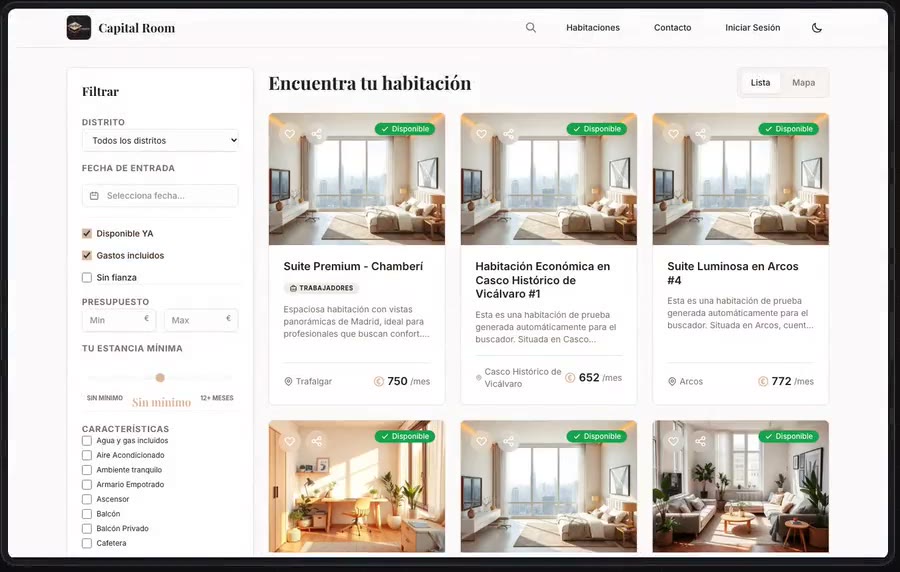
Capital Room is a good example. A landlord with rooms in several areas of Madrid wanted to stop managing lettings through messages and spreadsheets. A property theme gives you listings and a search box, but people looking for a room ask very specific questions: is it free on the date I want to move in? Can I stay for five months? Are bills included? Is there a deposit?
In the search I built, availability isn't a box someone ticks by hand. A room shows as free for your move-in date if it has no active booking overlapping that date. Your length of stay is checked against the minimum and maximum months each room accepts, and you can also filter by district and neighbourhood, budget, bills included, no deposit and features, then see the results as a list or on a map. It's the business logic written once, in one place, and the landlord keeps it up to date from their own panel.
The admin panel is half the project
There's a part of a website visitors never see that matters more than the home page to the people who use it every day: the admin panel. With a template, you adapt to whatever panel it ships with. With custom work, the panel is designed the other way round, starting from what your team actually does.
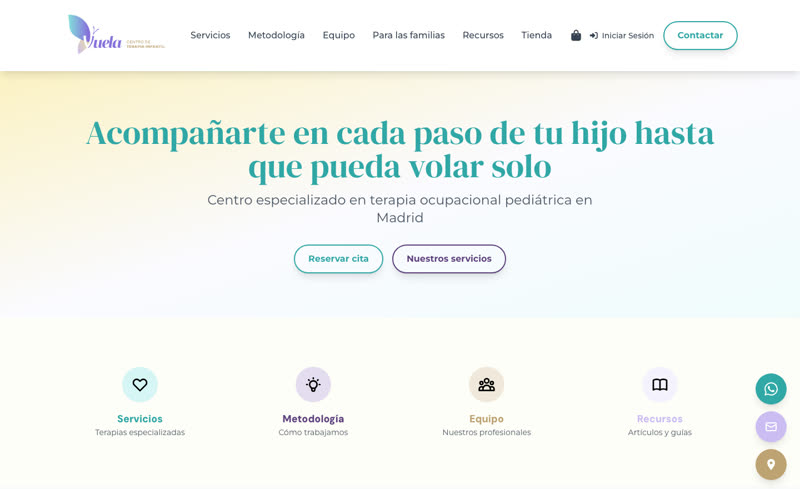
At Centro Vuela, a children's therapy centre in Alcalá de Henares, the public site explains services, approach and team to families who arrive with questions and in a hurry. Behind it sits a Filament panel where the centre manages its services, team, FAQs, resources blog, shop orders, discount codes and delivery options.
One small detail sums it up: the shop can be switched off from the panel's settings. When it's off, its pages simply stop existing for visitors, with no code changes and no need to call me. Decisions like that (what can be edited, who edits it and what happens when something is switched off) are what make a tool get used or quietly abandoned. And they're hard to get right on a generic panel.
The questions I ask before deciding
When someone tells me about their project, before we talk technology I try to answer these:
- What needs to happen on the site besides reading it? Booking, paying, signing, uploading, checking availability. The more actions with rules of their own, the stronger the case for custom.
- What does your team do by hand today? If the answer is "we note it in a spreadsheet and copy it across later", that's usually where the value is.
- How much will it change in a year? If you'll keep adding features, you want a foundation you can extend without fighting a platform's limits.
- Is the website what you sell? In a digital product like RARG, the website is the product. No template will do there.
- Who's going to maintain it? A template with fifteen plugins needs looking after too: updates, conflicts, the occasional scare. The difference is who answers when something breaks.
The cost isn't just building it: it's using and maintaining it for years. I've already covered what pushes a development budget up or down in how much a custom app costs in Spain, and nearly all of it applies to a website too.
The middle ground
It isn't always black or white. Sometimes the sensible move is to start on a template to test the waters and, once the business asks for more, build only the part that needs it: a private area, a search, an integration with your management software. Other times it's the reverse: the public site is simple, and what you really need is an internal tool.
And there are cases where custom is more about identity than logic. The wedding websites I've built for friends could have been put together on a template, but each couple wanted a different look (classic, festival, editorial) and things that were very much theirs: RSVPs with allergies and transport, a personalised ticket for every guest and a gallery where guests upload their photos from their phones.
My advice for deciding
Before you choose, write down what your website has to do on day one and what you'd like it to do a year from now. If it all fits under "say who I am and let people get in touch", find a good template and put the effort into the copy and the photos. If bookings with rules, your team's processes or a product you want to grow start to appear, it's worth a proper conversation.
If you're not sure which side your project falls on, tell me about it. I'll tell you honestly whether you need something custom or a template will do.