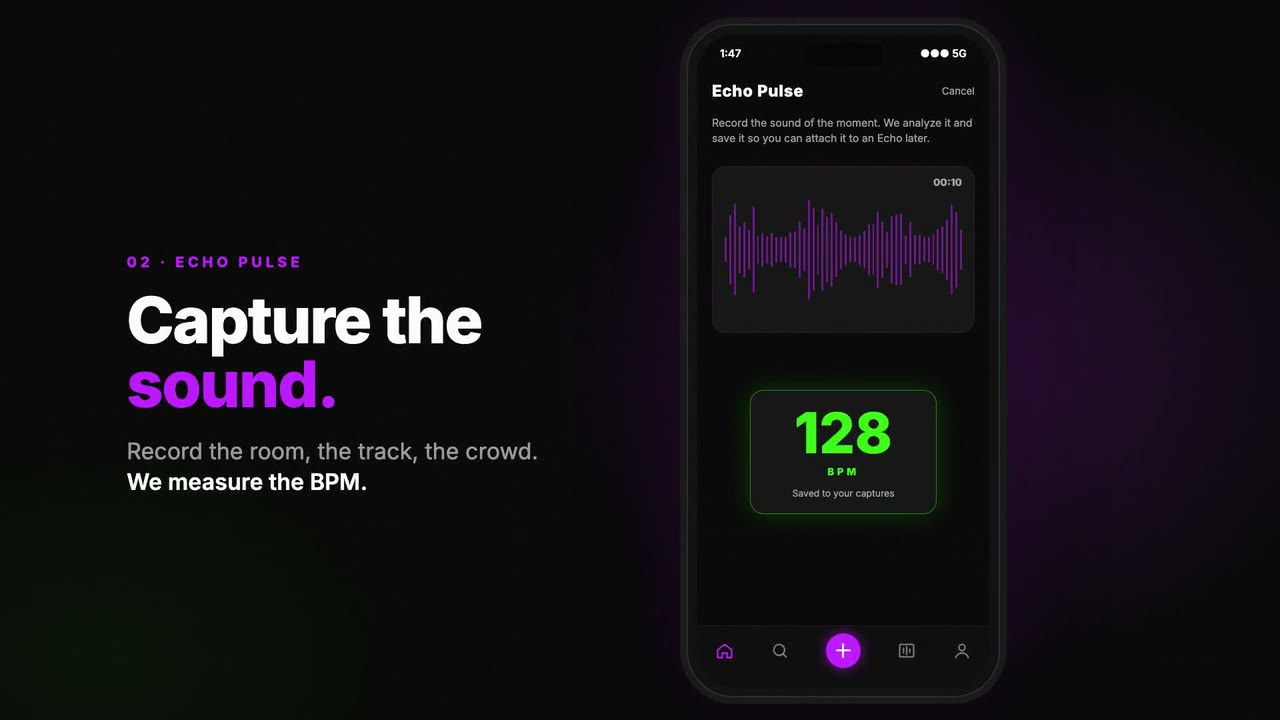
It's three in the morning, the room is packed and the DJ has just dropped a track you don't know. You take out your phone, press one button and, a few seconds later, you know how many BPM it was running at. That's the idea behind Echo Pulse, one of the features of Echoes, the club culture app I'm building.
On paper it sounds simple. In practice you have to decide where the audio gets analysed, what happens when there's no signal, how to read what the tool spits out and what to do when the algorithm makes a tempo up. Here's how I built it, with the real code.
How much audio you need
I started with 10 seconds. For a while the docs said 10 and the app recorded 12, the kind of inconsistency that creeps in when you move fast. When I redesigned the screen I settled on 15 seconds, and the number isn't arbitrary: an 8-bar phrase at 128 BPM is 32 beats, and 32 × 60 / 128 is exactly 15 seconds. That's enough for a whole build-up or drop without it turning into recording the set.
In the app, built with Expo and React Native, recording uses expo-audio with the high-quality preset and metering switched on. The metering isn't for the BPM: it makes the button react to the real sound while you record. Every 70 ms I read the microphone level, and when the volume jumps clearly above its recent average I fire a ring, as if it were the kick drum. At 15 seconds it stops on its own and the phone vibrates.
Save first, upload later
Clubs are basements. Signal disappears exactly where the app needs to work, so one architectural rule I won't bend in Echoes is that everything is offline-first. The Pulse is saved to a local queue before any upload attempt, with the real time of the recording. With no network it stays there and retries by itself when signal comes back or the app is opened.
So that retrying never duplicates anything, the client generates a UUID and the server is idempotent on it: if that Pulse already exists, it returns the existing one instead of creating another. Upload validation is short and specific too:
'duration' => ['required', 'numeric',
    'min:0', 'max:60'],
'file' => ['required', 'file', 'max:15360',
    'mimes:m4a,aac,mp3,wav'],
The result shows up instantly using the audio already on the phone. Upload and analysis carry on in the background, and while the server is busy the app checks the status every 2.5 seconds until the Pulse is either analysed or failed.
ffmpeg and aubio on the server
To detect tempo there were two options: pay for an audio analysis API or do it myself. Echoes started with a budget of zero, so I chose aubio, an open-source audio analysis library with a command-line tool, installed alongside ffmpeg on the same server that runs the Laravel API.
There are two steps. First, ffmpeg converts the phone's clip to a mono WAV at 44.1 kHz, which aubio reads best. Then aubio tempo works out the tempo:
ffmpeg -y -i pulse.m4a -ac 1 -ar 44100 pulse.wav
aubio tempo pulse.wav
From PHP I run both with Symfony's Process component, with a 60-second limit per command. aubio 0.4 prints the overall BPM as "128.0 bpm", so a regular expression is enough. And I throw away anything that makes no musical sense:
if (preg_match('/([\d.]+)\s*bpm/i', $out, $m)) {
    $bpm = round((float) $m[1], 1);

    return ($bpm >= 40 && $bpm <= 300)
        ? $bpm : null;
}
In case another aubio version returns a list of beats instead of the total, there's a fallback: I work out the gaps between beats, keep those between 0.2 and 2 seconds and take the median. The median copes far better than the mean with one missed or extra beat.
In the same pass I get two more values out of ffmpeg. Energy, from the mean volume reported by the volumedetect filter, mapped to a 0–1 scale where -45 dB is 0 and 0 dB is 1. And the waveform: 64 normalised amplitude peaks, so the app's player lights up with the real audio rather than a generic drawing.
Analysis runs inside the upload request itself and takes around 3 to 4 seconds, so the BPM comes back in the response. It's synchronous on purpose: the API's queue also processes the night videos, and this way the Pulse doesn't depend on it.
When aubio makes the tempo up
The oddest bug turned up while testing in silence. aubio always finds a tempo, even when nothing is playing: a completely silent clip came back as 137 BPM. A user who records in the cloakroom queue and sees "137 BPM" stops trusting the feature.
The fix was to use energy as a gate. Below 0.1 on my scale, roughly -40 dB of mean volume, there's no music to measure and I don't return a BPM. The app explains why instead of showing a fake number:
// aubio finds a tempo even in silence
'bpm' => $energy < self::MIN_ENERGY_FOR_BPM
    ? null
    : $this->detectBpm($wav),
That case has a test: I generate five seconds of silence with ffmpeg and check that the BPM is null and the energy is zero. Another test synthesises a 440 Hz tone and checks the waveform has the requested number of peaks, all between 0 and 1.
On accuracy, I'd rather be straight with you. The real test I've done was playing a 125 BPM track through speakers and recording it with the app: the server returned 125.2. A good sign, but that's clean music, not a room full of people shouting. Tempo detectors can lock onto half or double the real tempo, and crowd noise or someone talking next to the mic doesn't help. I still need to test it properly in a club, and until then I won't promise figures.
Always keep the original audio
The decision that gives me the most peace of mind is this one: the original clip is always stored, whether the analysis works or not. If the server doesn't have ffmpeg or aubio installed, the Pulse is marked as failed but nothing is lost. Once the tools are available, a command queues it again:
php artisan echoes:reanalyze-pulses
php artisan echoes:reanalyze-pulses --all
The --all option also re-runs the ones that were already fine. So if I improve the algorithm or change the silence threshold, I can recalculate the whole history. And if there's ever budget for song recognition, it's designed behind a driver interface, and today's recordings can be analysed then.
With the BPM stored, things start to emerge. Your "Music DNA" works out an intensity score from the average of your Pulses, and the venue panel draws the curve of the night with BPM by the hour.
If you're thinking about something similar, my advice is to start with the open-source tool on your own server, always keep the raw data and distrust any number the algorithm gives you without sound behind it. If you've got a project involving audio, mobile or real-time data, tell me about it and we'll take a look.