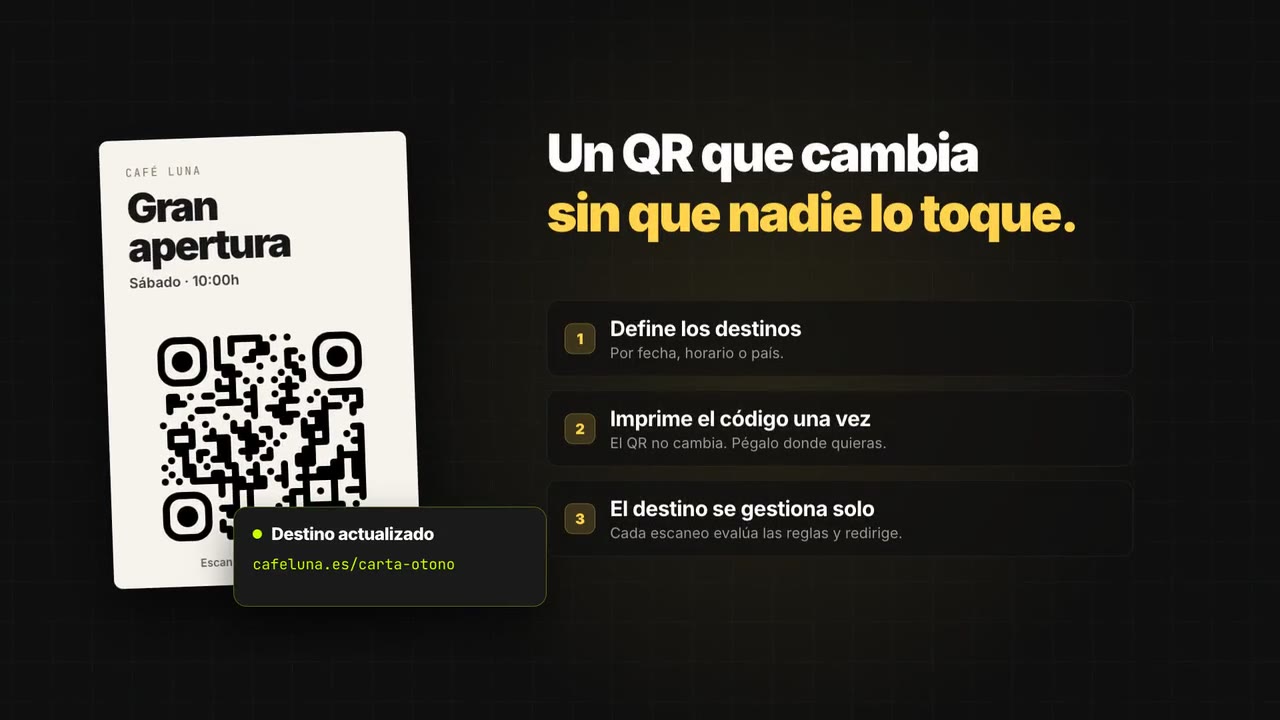
A "Grand opening" poster, Saturday at ten. A thousand flyers fresh from the printer and, in the corner, a QR code pointing at an address that no longer exists. Someone scans it and lands on a 404. There's no fixing it: either you reprint the lot, or you stick a label over every single flyer.
That's exactly the scene that opens the launch video for RARG, the QR code and short link SaaS I build and run. I didn't pick it by chance: it's the problem QR Smart, the product's headline feature, was made to solve.
Why a regular QR code goes stale
A QR code is just a web address drawn in little squares. If it contains yourbar.com/summer-menu, that's what it will open forever. Paper doesn't update itself.
The trick behind a dynamic QR code is that it doesn't hold the final destination. It holds a short link that I control. When someone scans it, the server decides there and then where to send them. The printed pattern never changes; the answer does.
There's a technical detail that looks minor and isn't: that redirect has to be temporary. RARG always answers with a 302 redirect, never a 301. A 301 tells the browser "this has moved for good, remember it", and some phones would cache the first destination and never ask again. With a 302 every scan goes through the server, which is why changing the destination actually works.
Destinations that switch on their own by date and time
Changing the destination by hand is already handy, but you have to remember to do it. What QR Smart does is let you set the rules up in advance. Each destination can have a start date and time and an end date and time, and the code moves from one to the next without anyone touching it.
Take an event:
- Until the day before, the poster's QR code goes to ticket pre-sales.
- On the day, from nine in the morning, it goes to the programme and the venue map.
- Once it's over, it goes to the photo gallery or a feedback survey.
One poster, three moments. And if the printer got the event date wrong, you fix it in the dashboard and that's that.
On top of dates, each rule can filter by country and by device type. So the same code can send people scanning from France to the French version, or show a different page on a phone than on a laptop.
What happens when two rules match
This is where the design gets more interesting than it looks. If one rule says "Spain" and another says "Spain, on mobile, over the weekend", which one wins? I decided the most specific one always does. Each rule scores a point for every type of condition (country, device) and another if it has dates. They're sorted from most to least specific, and the first one that's active and matches the person scanning is used. If none matches, the visitor goes to the main destination, which acts as a safety net: nobody ends up on a blank page.
To me it's the most predictable approach for someone who isn't technical. You don't need to think about the order you created the rules in: the specific beats the general, which is what you'd expect.
A link that knows when to start and when to stop
Beyond destinations, every link has its own schedule. You can give it a start date, an end date and a maximum number of scans. Before the start, people see when it opens. Once it ends, is paused or runs out of scans, they see the owner's message or, depending on the plan, get sent to another website. Those out-of-window scans aren't counted in the stats, so the data stays clean.
This fits promotions really well: a code for the first hundred people, or an offer that expires on Sunday at midnight without you having to watch the clock.
There's another piece I consider just as important: warning you when a destination breaks. On the plans that include it, RARG regularly checks that the website each link points to still responds and, for smart QR codes, checks every destination separately. If it fails twice in a row, the owner gets one notice, not a flood of emails. Back to the opening scene: the flyer with the wrong URL would have been caught within hours, not when a customer complained.
Knowing who scans and from where
A printed QR code is the hardest part of marketing to measure. With a link in the middle that changes, because every scan passes through the server and can be recorded: country, city, device type, browser, operating system, language and where the visit came from. The dashboard shows the trend by day and the split for each of those.
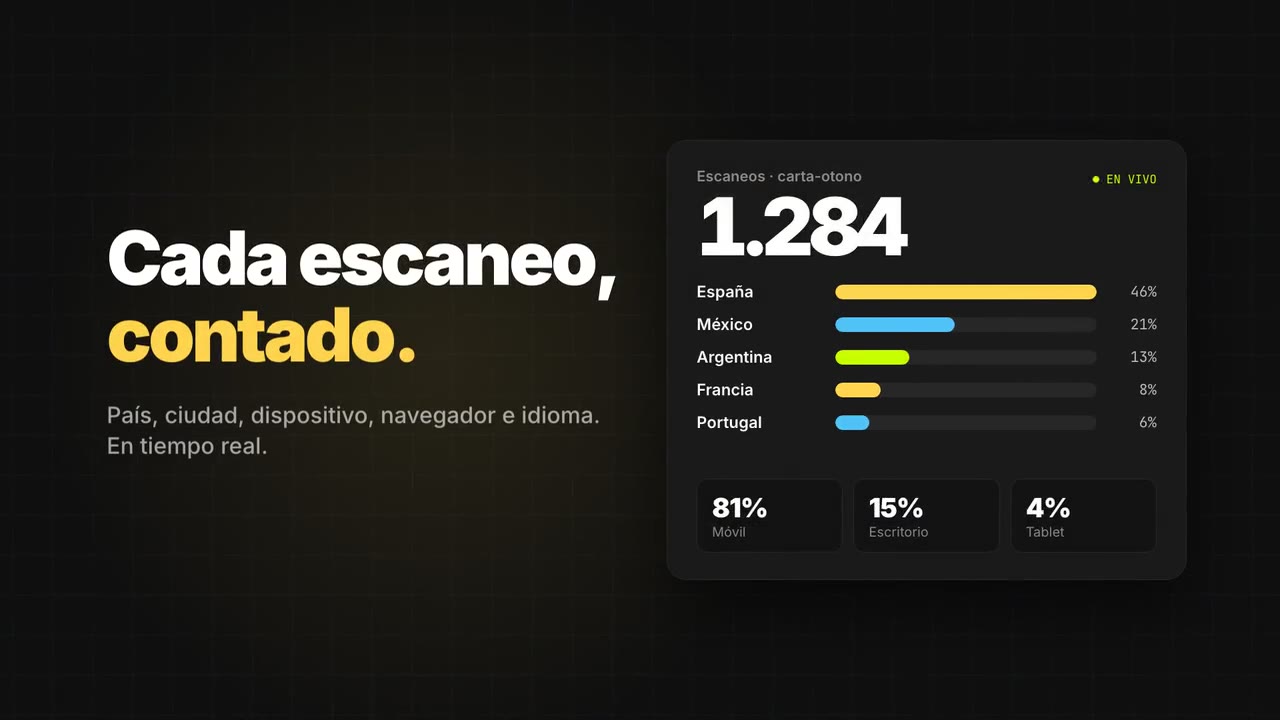
For a small business this answers very practical questions. Do the street posters work better than the ones on the counter? Use a different code in each place and compare. How many people scan the menu from outside the country? The country split tells you. Is a tablet-friendly version worth it? The device split tells you.
Where a dynamic QR code makes sense
Not everything needs one. If you're putting your usual website on a business card, a regular QR code is fine. A dynamic one pays off when the print will outlive the content it points to:
- Event posters and flyers, which go through pre-sales, the day itself and the aftermath.
- Bar and restaurant menus, which change with the seasons or have a special menu on key dates, without reprinting the table stands.
- Packaging and labels, printed in long runs and still in circulation after the campaign has finished.
- Stands and conferences, where the same code leads to the agenda during the event and to the materials afterwards.
My practical advice: before sending anything to print, ask yourself what you'll want someone scanning that piece of paper to see in six months' time. If the answer isn't "the same as today", you need a code you can change.
If you've got a project where print and digital need to work together (events, menus, campaigns or something that doesn't have a name yet), tell me about it and we'll work out how to approach it.